
جميع لغات الدليل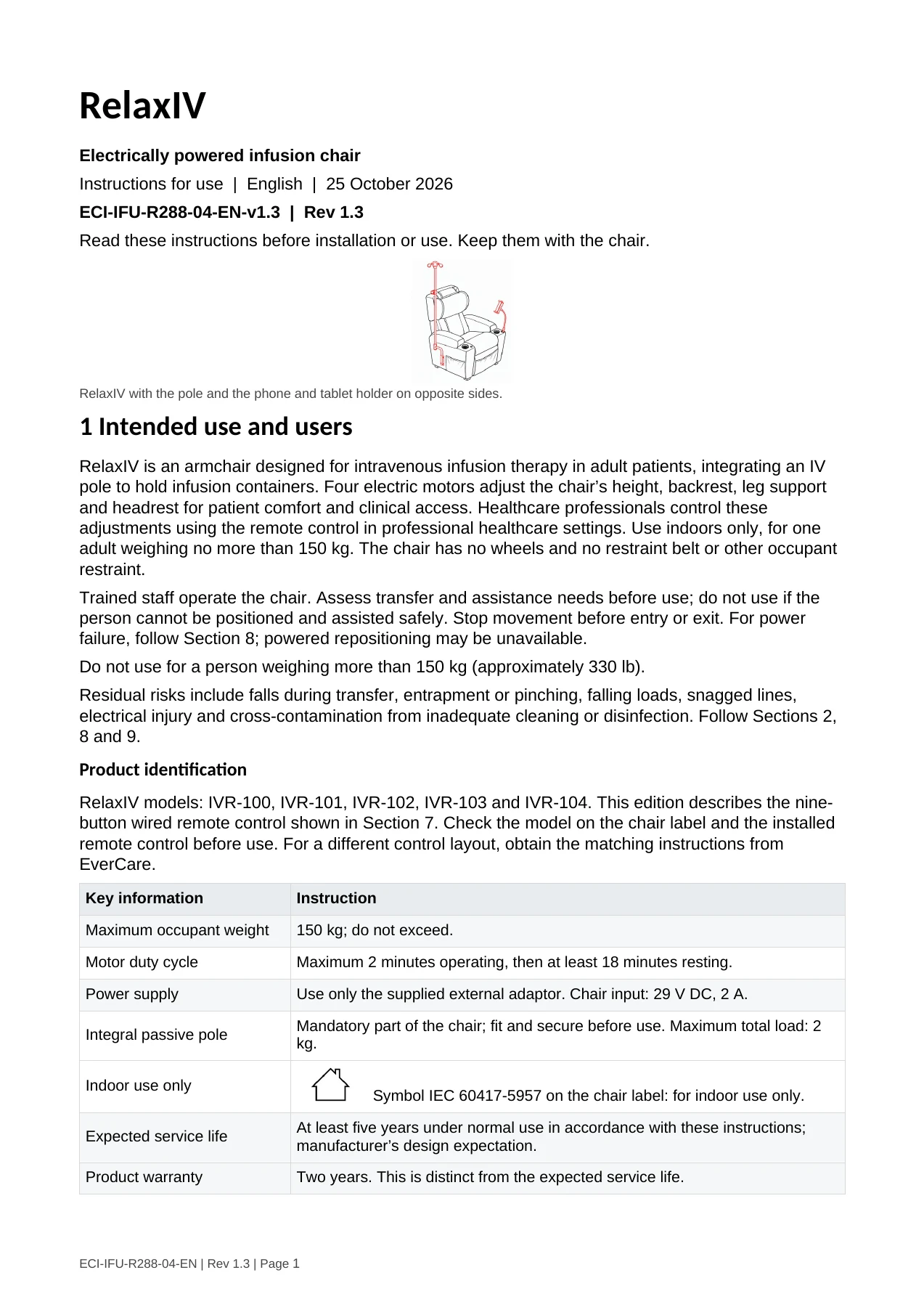
RelaxIV · تعليمات الاستخدام
English · الإصدار 1.3 · تاريخ الإصدار
مرّر لقراءة الدليل كاملًا. يمكنك أيضًا فتح ملف PDF الأصلي أو تنزيله.
قراءة الدليل كنص
صفحة 1
RelaxIV
Electrically powered infusion chair
Instructions for use | English | 25 October 2026
ECI-IFU-R288-04-EN-v1.3 | Rev 1.3
Read these instructions before installation or use. Keep them with the chair.


RelaxIV with the pole and the phone and tablet holder on opposite sides.

1 Intended use and users
RelaxIV is an armchair designed for intravenous infusion therapy in adult patients, integrating an IV
pole to hold infusion containers. Four electric motors adjust the chair’s height, backrest, leg support
and headrest for patient comfort and clinical access. Healthcare professionals control these
adjustments using the remote control in professional healthcare settings. Use indoors only, for one
adult weighing no more than 150 kg. The chair has no wheels and no restraint belt or other occupant
restraint.
Trained staff operate the chair. Assess transfer and assistance needs before use; do not use if the
person cannot be positioned and assisted safely. Stop movement before entry or exit. For power
failure, follow Section 8; powered repositioning may be unavailable.
Do not use for a person weighing more than 150 kg (approximately 330 lb).
Residual risks include falls during transfer, entrapment or pinching, falling loads, snagged lines,
electrical injury and cross-contamination from inadequate cleaning or disinfection. Follow Sections 2,
8 and 9.
Product identification
RelaxIV models: IVR-100, IVR-101, IVR-102, IVR-103 and IVR-104. This edition describes the nine-
button wired remote control shown in Section 7. Check the model on the chair label and the installed
remote control before use. For a different control layout, obtain the matching instructions from
EverCare.
 Key information                    Instruction

 Maximum occupant weight            150 kg; do not exceed.

 Motor duty cycle                   Maximum 2 minutes operating, then at least 18 minutes resting.

 Power supply                       Use only the supplied external adaptor. Chair input: 29 V DC, 2 A.

                                    Mandatory part of the chair; fit and secure before use. Maximum total load: 2
 Integral passive pole
                                    kg.

 Indoor use only
                                                 Symbol IEC 60417-5957 on the chair label: for indoor use only.

                                    At least five years under normal use in accordance with these instructions;
 Expected service life
                                    manufacturer’s design expectation.

 Product warranty                   Two years. This is distinct from the expected service life.


ECI-IFU-R288-04-EN | Rev 1.3 | Page 1
صفحة 2
2 Safety information
Read this guide before assembly, operation, cleaning or maintenance.
Electrical safety
Disconnect the adaptor from the mains before assembly, cleaning, maintenance, moving the
chair or connecting and disconnecting cables. Keep the mains plug accessible.
Use only the supplied power supply and compatible manufacturer-approved cables. Do not
connect mains voltage directly to the chair. Do not modify, open or repair the adaptor, actuators
or remote control yourself.
Inspect the cables, connectors and remote control for damage. Keep cables away from moving
parts, sharp edges and walking routes. Do not operate with damaged, loose or wet electrical
parts.
Keep the chair and electrical components dry. Do not spray, immerse or steam-clean them. Do
not use outdoors, in rain, in an MRI room, near flammable anaesthetics or in an oxygen-enriched
atmosphere.
Movement and entrapment
Place the furniture to avoid creating entrapment hazards with other furniture. Use a flat, stable
floor. Allow clearance for the full range of movement, including from walls. Keep hands, feet,
clothing, cables and any lines clear of the mechanism.
When operating a switch that initiates and maintains the movement of the furniture, terminates
the movement of the furniture or changes its direction, make sure that other persons are kept
away. Keep children away during adjustment.
Medical-use restriction: adult patients only; trained healthcare staff operate the chair. The
following general appliance warning does not authorise children to be patients or operators: This
appliance can be used by children aged from 8 years and above and persons with reduced
physical, sensory or mental capabilities or lack of experience and knowledge if they have been
given supervision or instruction concerning use of the appliance in a safe way and understand the
hazards involved. Children shall not play with the appliance.
For this medical use, cleaning and user maintenance are performed by trained staff only. Children
must not clean or maintain the chair, even under supervision.
Do not operate the chair while a person is entering or leaving it. Supervise the seated person
throughout adjustment. Stop movement immediately if there is an obstruction, unusual noise or
unexpected response.
Do not sit, stand or climb on armrests, the leg support or accessories. Do not use the pole or
phone and tablet holder as a support handle. Keep loads within the relevant limits.
Do not use the chair until installation and functional checks have been completed by trained staff.
Examine the appliance frequently for signs of wear or damage. If there are such signs, or if the
appliance has been misused or does not work, stop use and contact the supplier for further
information.
Heat and surface protection
Keep the chair at least 1 metre from heaters, stoves and other heat sources. Do not place hot
equipment or containers on it. Avoid prolonged direct sunlight, excessive moisture and dust.
Protect upholstery and structural parts from sharp objects, impacts and animal damage. Do not
pull exposed stitching. Report damaged seams or surfaces that cannot be cleaned effectively.
Handling and relocation
Manufacturer-reported chair mass: 70 kg. Confirm the handling mass of the actual unit, including
fitted accessories, before selecting handling equipment. Make sure the chair is unoccupied and
disconnect power before relocation. Secure or remove loose accessories without damaging the
integral pole assembly. Use trained personnel and suitable handling equipment. Do not lift or drag
the chair by the armrests, backrest, pole, remote control or phone and tablet holder.
The chair has no wheels. Arrange relocation through technical staff. Do not move the chair with a
person seated. Keep the chair upright and protect the power lead and accessories during handling.
ECI-IFU-R288-04-EN | Rev 1.3 | Page 2صفحة 3
3 Preparation and power connection
Before installation
Installation is for trained technical personnel. Work in a clean, dry area with enough space to support
the chair safely. Disconnect the mains supply. Protect the upholstery; do not seat anyone on a partly
assembled chair.
 Check                          What to verify

 Chair and backrest             No transport damage; upholstery intact; matching mounting hardware present.

 Backrest side wings            Both supplied wings and their matching slide brackets present.

 Pole assembly                  Lower and upper pole sections, hooks, locking parts and chair receiver present.

                                Supplied paper-roll/towel support, flexible phone and tablet holder and line guide
 Accessories
                                present where included.

                                External adaptor, mains lead, chair wiring and nine-button wired remote control
 Electrical parts
                                are the supplied compatible set.

                                Supplied mounting hardware present; tools fit the fasteners. Do not substitute
 Fasteners and tools
                                screw lengths or grades.


Use the supplied mounting hardware and a tool that fits each fastener. Do not substitute screw
lengths or grades, or estimate a tightening torque. If a fixing cannot be installed securely using the
instructions in Sections 4 to 6, stop and contact EverCare before use.
External adaptor

 Item                           Recorded identification

 Manufacturer and model         Dongguan YIHENG Electronics Co., Ltd. A64A00290200

 Adaptor input                  100-240 V AC, 50/60 Hz, 2.0 A

 Adaptor output                 29 V DC, 2.0 A, 58 W

 Electrical construction        Class II adaptor.


Check that the adaptor supplied with the production chair matches its approved identification. A
different adaptor must not be selected merely because its voltage appears similar.
Connection sequence
1. With mains power disconnected, connect each keyed chair connector only to its matching socket.
   Do not force a connector or pull on a cable. Confirm retention is fully engaged.
2. Route cables so that full chair movement cannot pinch, stretch, abrade or disconnect them. Keep
   the adaptor ventilated, dry and clear of the mechanism.
3. Complete all mechanical installation and cable checks before connecting the supplied mains lead
   to the external adaptor and a suitable mains outlet.
4. Test the chair unoccupied. Check each remote control function and its stopping response as
   described in Section 7 before use.


ECI-IFU-R288-04-EN | Rev 1.3 | Page 3
صفحة 4
4 Mechanical installation
Disconnect the mains supply before assembly. Support each component until its mounting parts are
secure. Follow the assembly instructions in Sections 4 and 5 and complete the installation checks in
Section 6. Use only the supplied mounting hardware. Do not use the chair if a fixing is loose or its
installation is unclear.
Backrest attachment


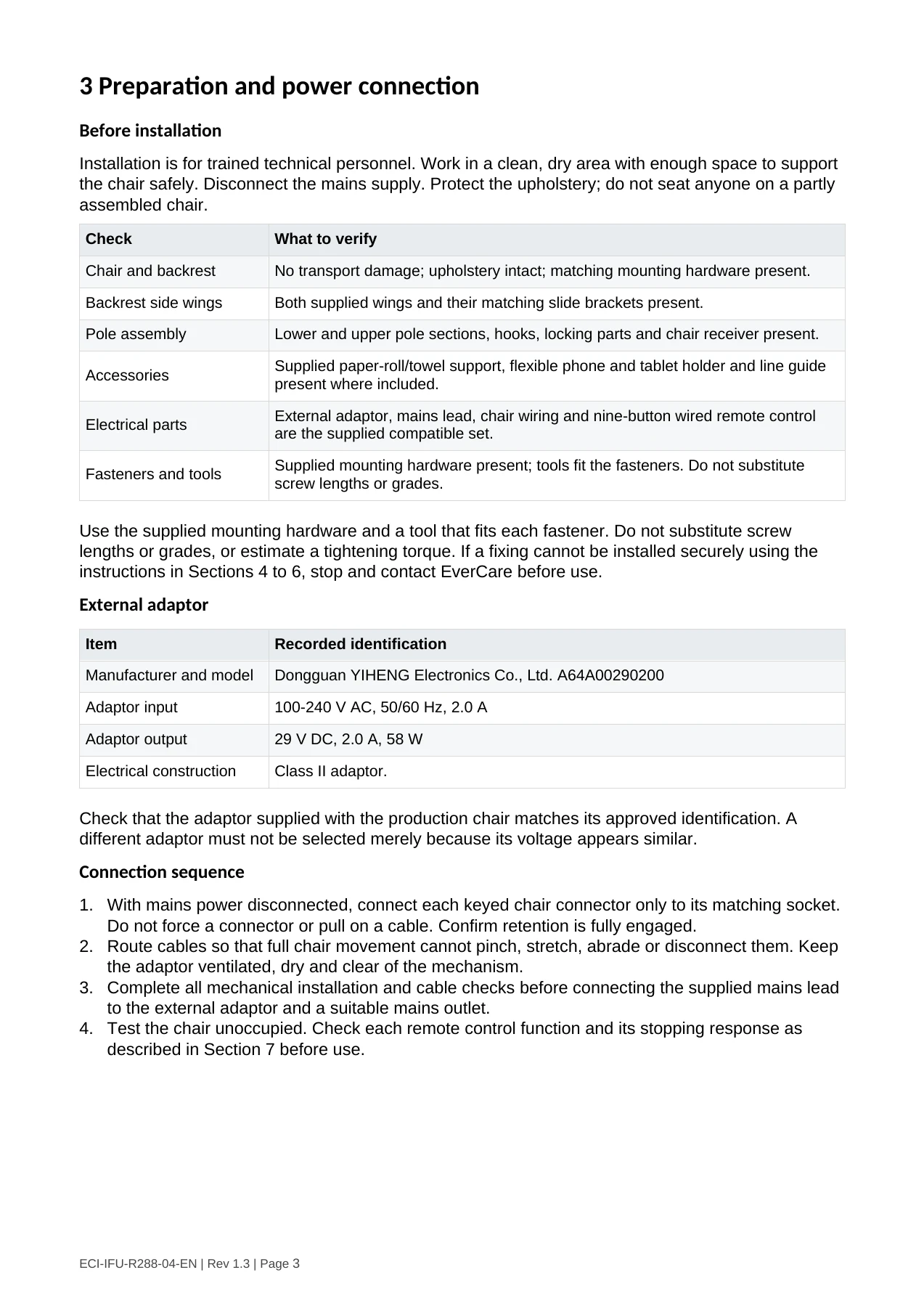
Backrest mounting guides and positioning. Engage the matching parts on both sides and secure the backrest before applying load.

Align the matching backrest mounting parts on both sides. Support the backrest throughout
installation. Verify that both sides are fully engaged and that the backrest is secure before connecting
power or applying load.
Do not force, drill or modify the brackets. If the supplied brackets, retention parts or fasteners cannot
be fitted as illustrated, stop installation and contact EverCare.
Chair wiring and side hardware


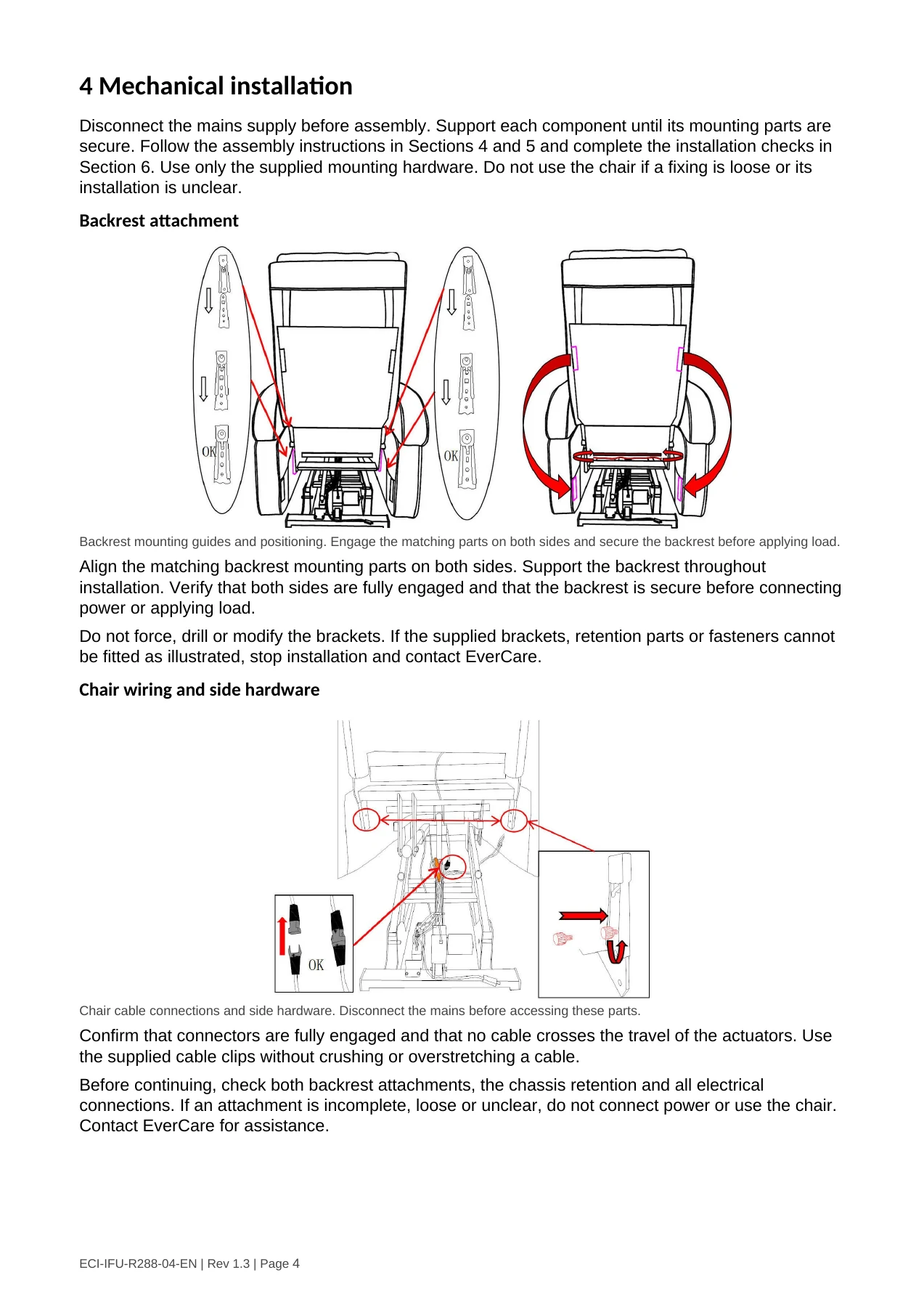
Chair cable connections and side hardware. Disconnect the mains before accessing these parts.

Confirm that connectors are fully engaged and that no cable crosses the travel of the actuators. Use
the supplied cable clips without crushing or overstretching a cable.
Before continuing, check both backrest attachments, the chassis retention and all electrical
connections. If an attachment is incomplete, loose or unclear, do not connect power or use the chair.
Contact EverCare for assistance.


ECI-IFU-R288-04-EN | Rev 1.3 | Page 4
صفحة 5
5 Side supports and accessories
Backrest side wings and rear support


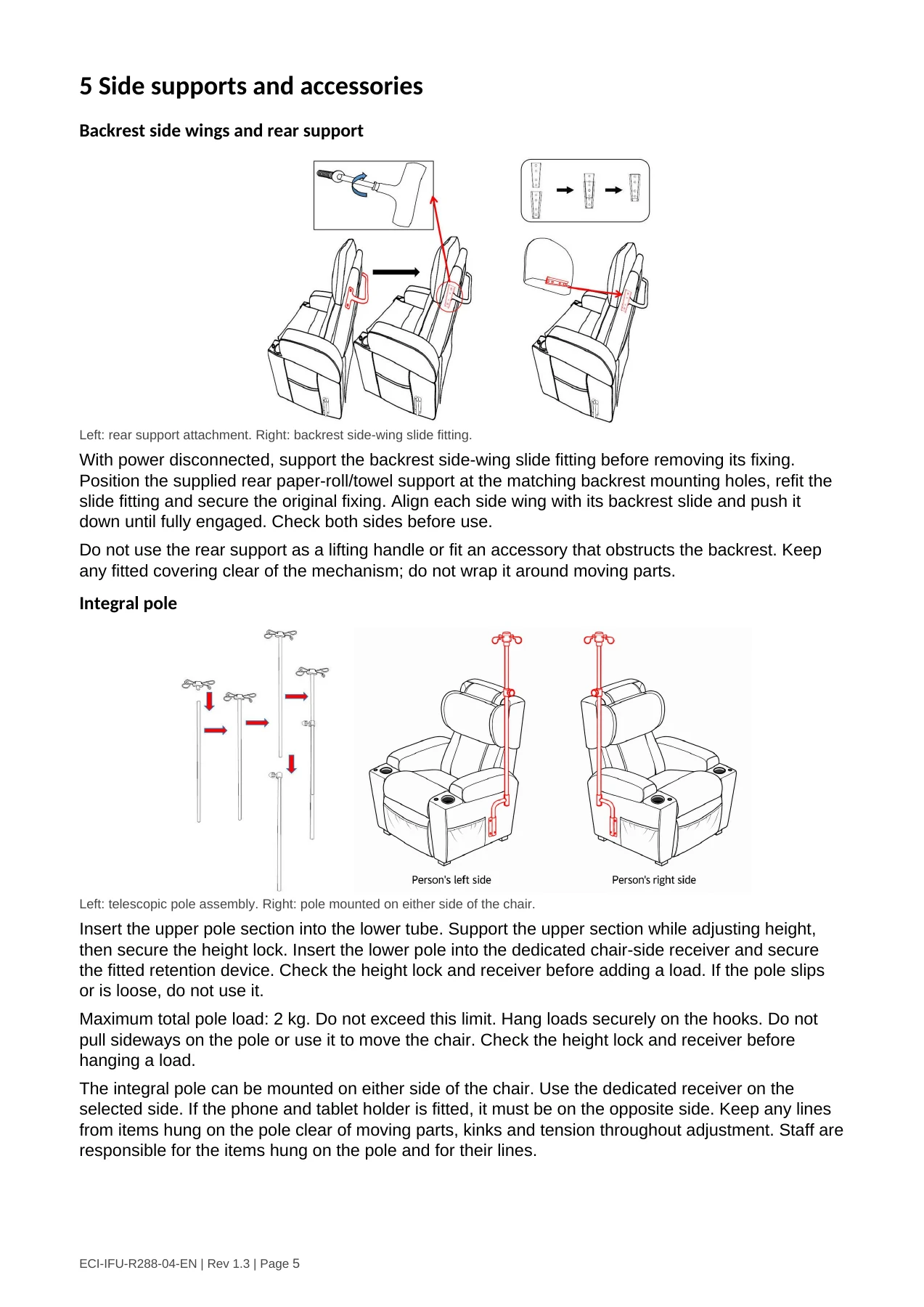
Left: rear support attachment. Right: backrest side-wing slide fitting.

With power disconnected, support the backrest side-wing slide fitting before removing its fixing.
Position the supplied rear paper-roll/towel support at the matching backrest mounting holes, refit the
slide fitting and secure the original fixing. Align each side wing with its backrest slide and push it
down until fully engaged. Check both sides before use.
Do not use the rear support as a lifting handle or fit an accessory that obstructs the backrest. Keep
any fitted covering clear of the mechanism; do not wrap it around moving parts.
Integral pole


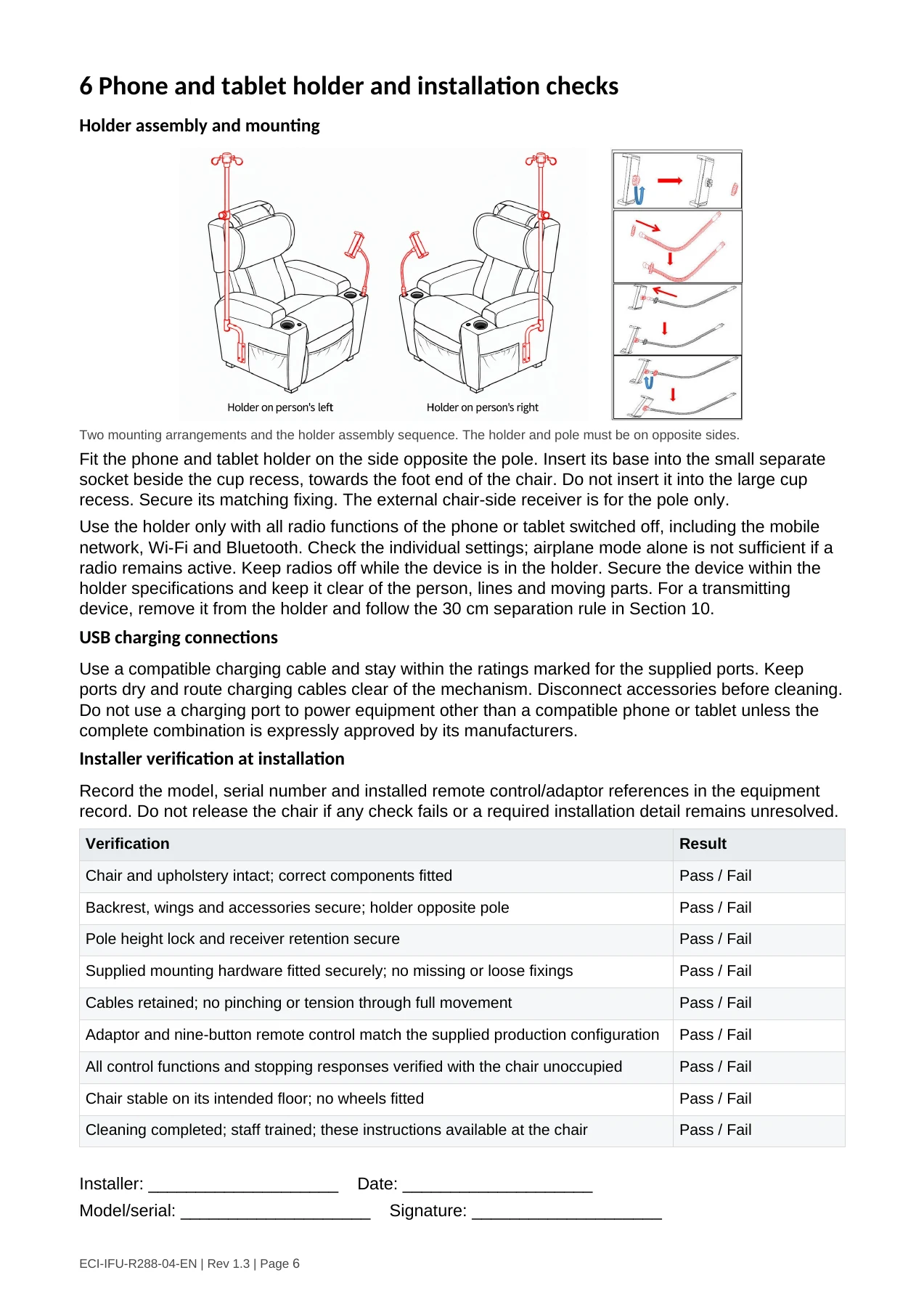
Left: telescopic pole assembly. Right: pole mounted on either side of the chair.

Insert the upper pole section into the lower tube. Support the upper section while adjusting height,
then secure the height lock. Insert the lower pole into the dedicated chair-side receiver and secure
the fitted retention device. Check the height lock and receiver before adding a load. If the pole slips
or is loose, do not use it.
Maximum total pole load: 2 kg. Do not exceed this limit. Hang loads securely on the hooks. Do not
pull sideways on the pole or use it to move the chair. Check the height lock and receiver before
hanging a load.
The integral pole can be mounted on either side of the chair. Use the dedicated receiver on the
selected side. If the phone and tablet holder is fitted, it must be on the opposite side. Keep any lines
from items hung on the pole clear of moving parts, kinks and tension throughout adjustment. Staff are
responsible for the items hung on the pole and for their lines.


ECI-IFU-R288-04-EN | Rev 1.3 | Page 5
صفحة 6
6 Phone and tablet holder and installation checks
Holder assembly and mounting


Two mounting arrangements and the holder assembly sequence. The holder and pole must be on opposite sides.
Fit the phone and tablet holder on the side opposite the pole. Insert its base into the small separate
socket beside the cup recess, towards the foot end of the chair. Do not insert it into the large cup
recess. Secure its matching fixing. The external chair-side receiver is for the pole only.
Use the holder only with all radio functions of the phone or tablet switched off, including the mobile
network, Wi-Fi and Bluetooth. Check the individual settings; airplane mode alone is not sufficient if a
radio remains active. Keep radios off while the device is in the holder. Secure the device within the
holder specifications and keep it clear of the person, lines and moving parts. For a transmitting
device, remove it from the holder and follow the 30 cm separation rule in Section 10.
USB charging connections
Use a compatible charging cable and stay within the ratings marked for the supplied ports. Keep
ports dry and route charging cables clear of the mechanism. Disconnect accessories before cleaning.
Do not use a charging port to power equipment other than a compatible phone or tablet unless the
complete combination is expressly approved by its manufacturers.
Installer verification at installation
Record the model, serial number and installed remote control/adaptor references in the equipment
record. Do not release the chair if any check fails or a required installation detail remains unresolved.
 Verification                                                                                   Result

 Chair and upholstery intact; correct components fitted                                         Pass / Fail

 Backrest, wings and accessories secure; holder opposite pole                                   Pass / Fail

 Pole height lock and receiver retention secure                                                 Pass / Fail

 Supplied mounting hardware fitted securely; no missing or loose fixings                        Pass / Fail

 Cables retained; no pinching or tension through full movement                                  Pass / Fail

 Adaptor and nine-button remote control match the supplied production configuration             Pass / Fail

 All control functions and stopping responses verified with the chair unoccupied                Pass / Fail

 Chair stable on its intended floor; no wheels fitted                                           Pass / Fail

 Cleaning completed; staff trained; these instructions available at the chair                   Pass / Fail


Installer: ____________________             Date: ____________________
Model/serial: ____________________               Signature: ____________________


ECI-IFU-R288-04-EN | Rev 1.3 | Page 6
صفحة 7
7 Wired remote control
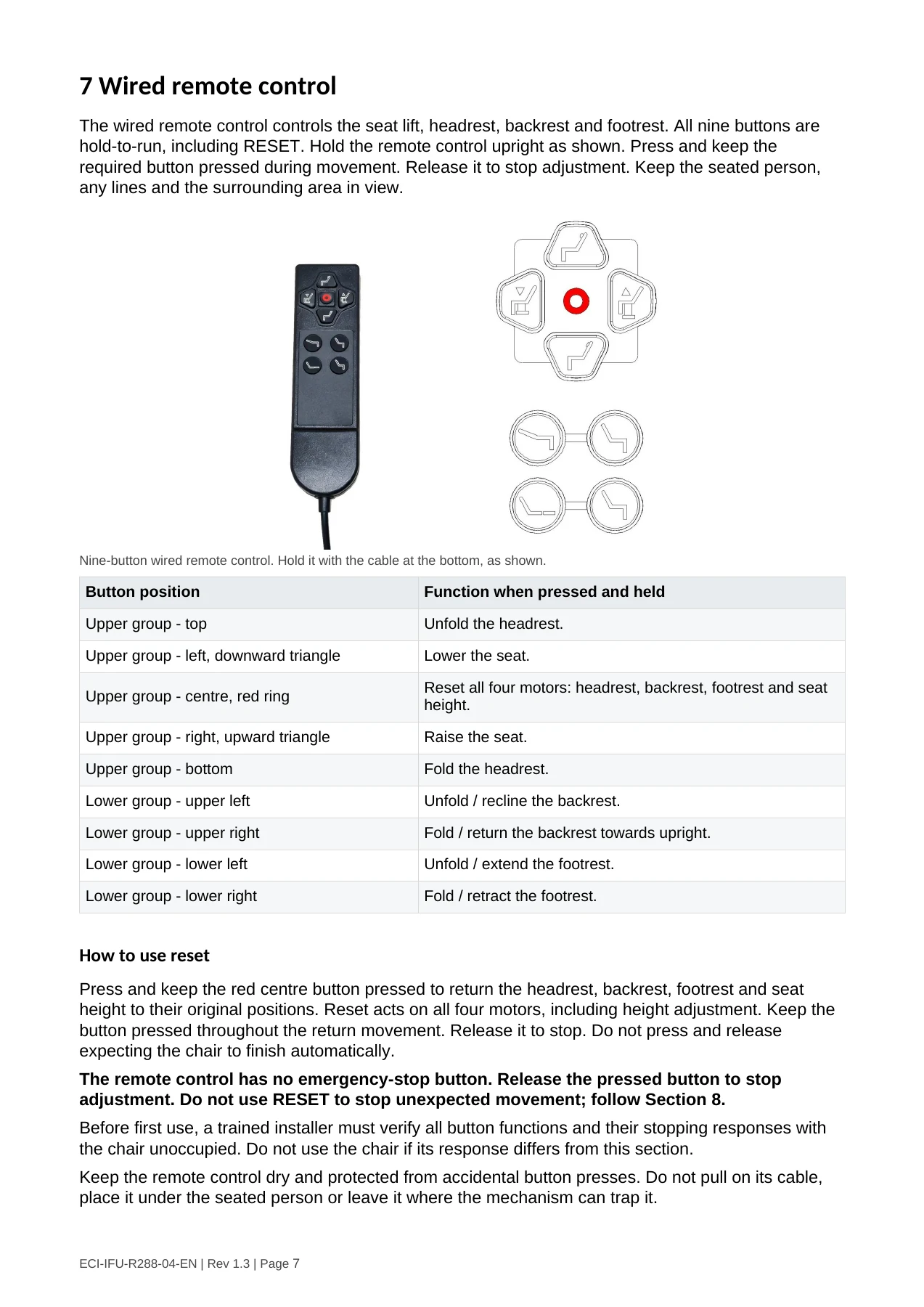
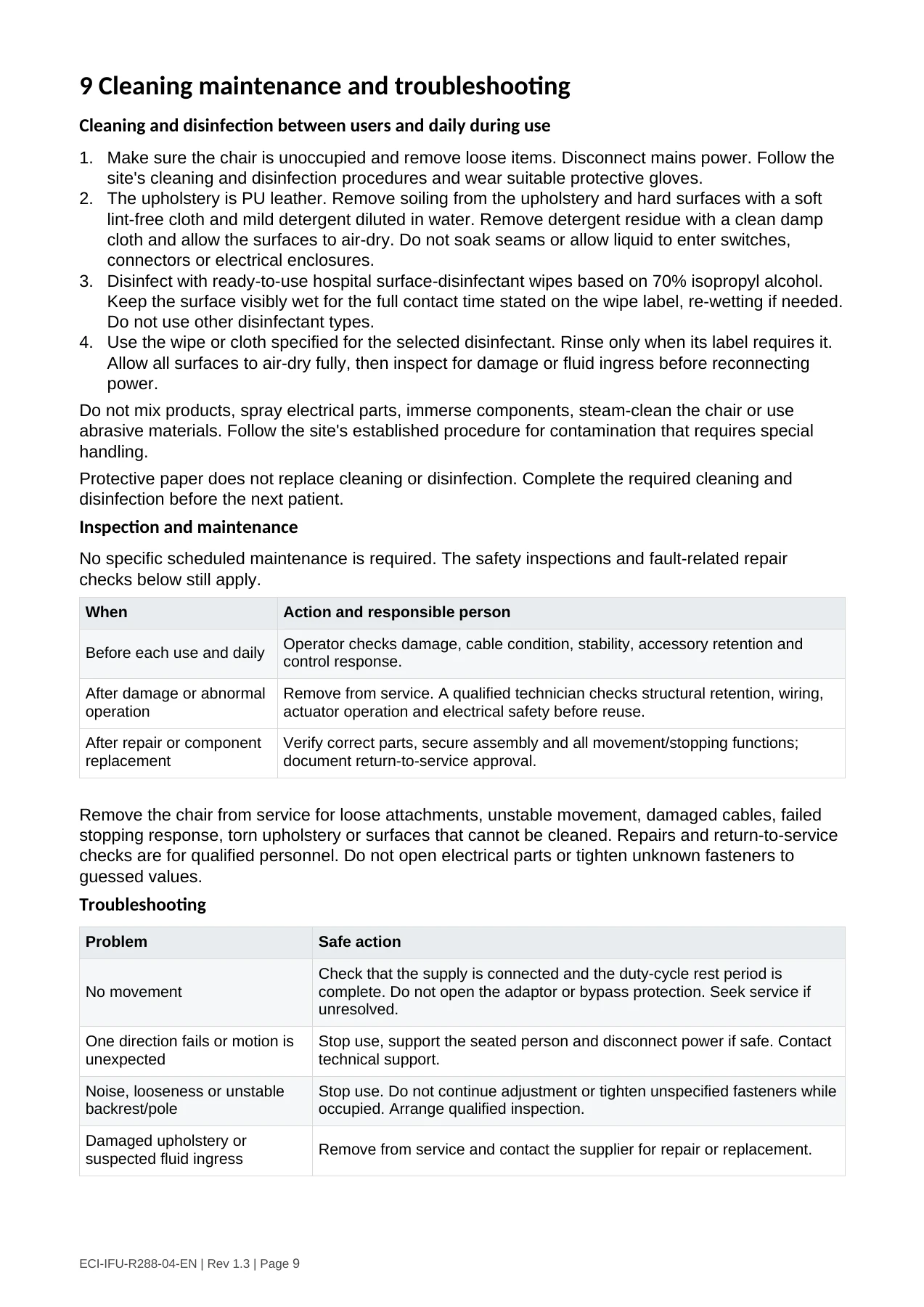
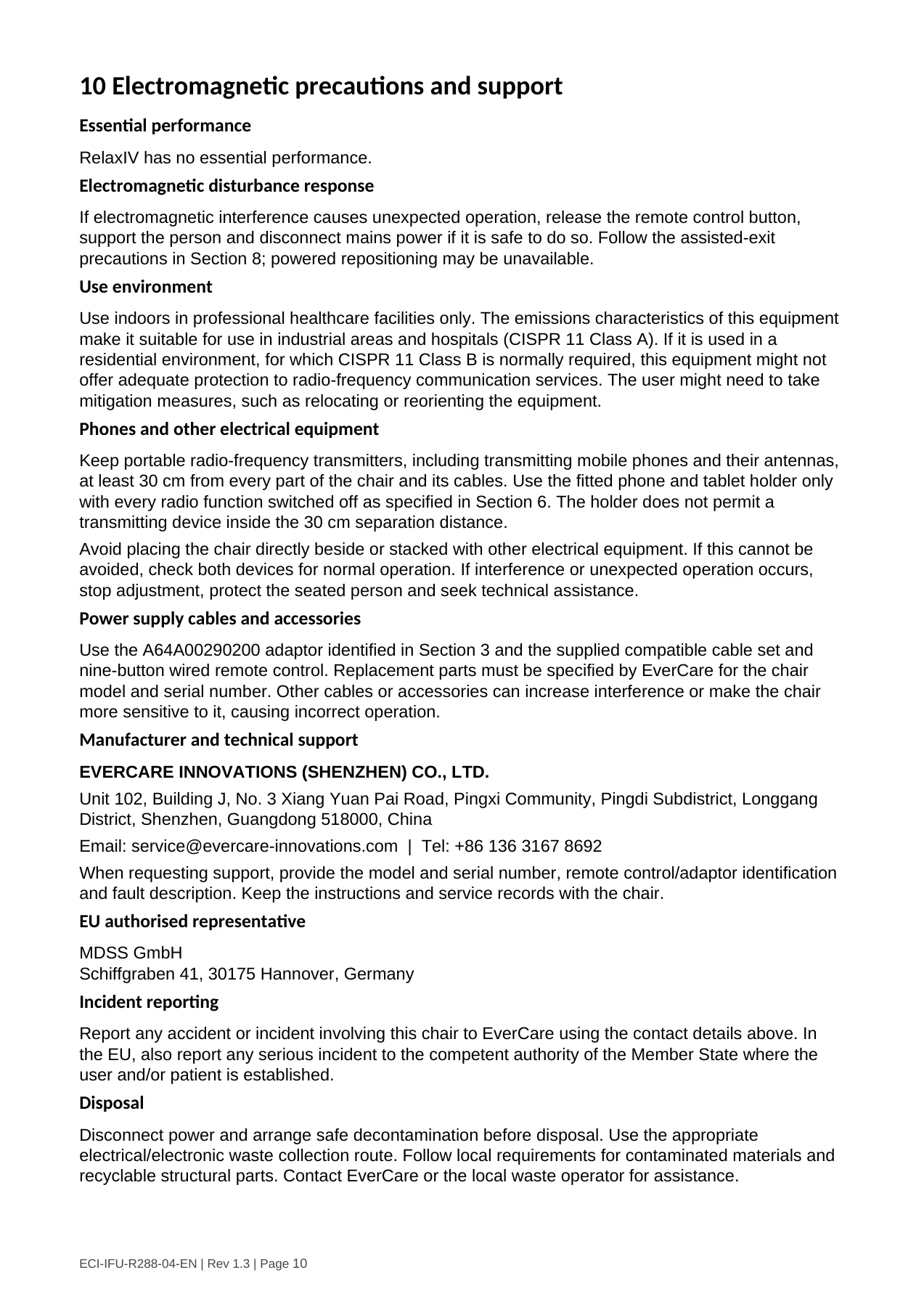
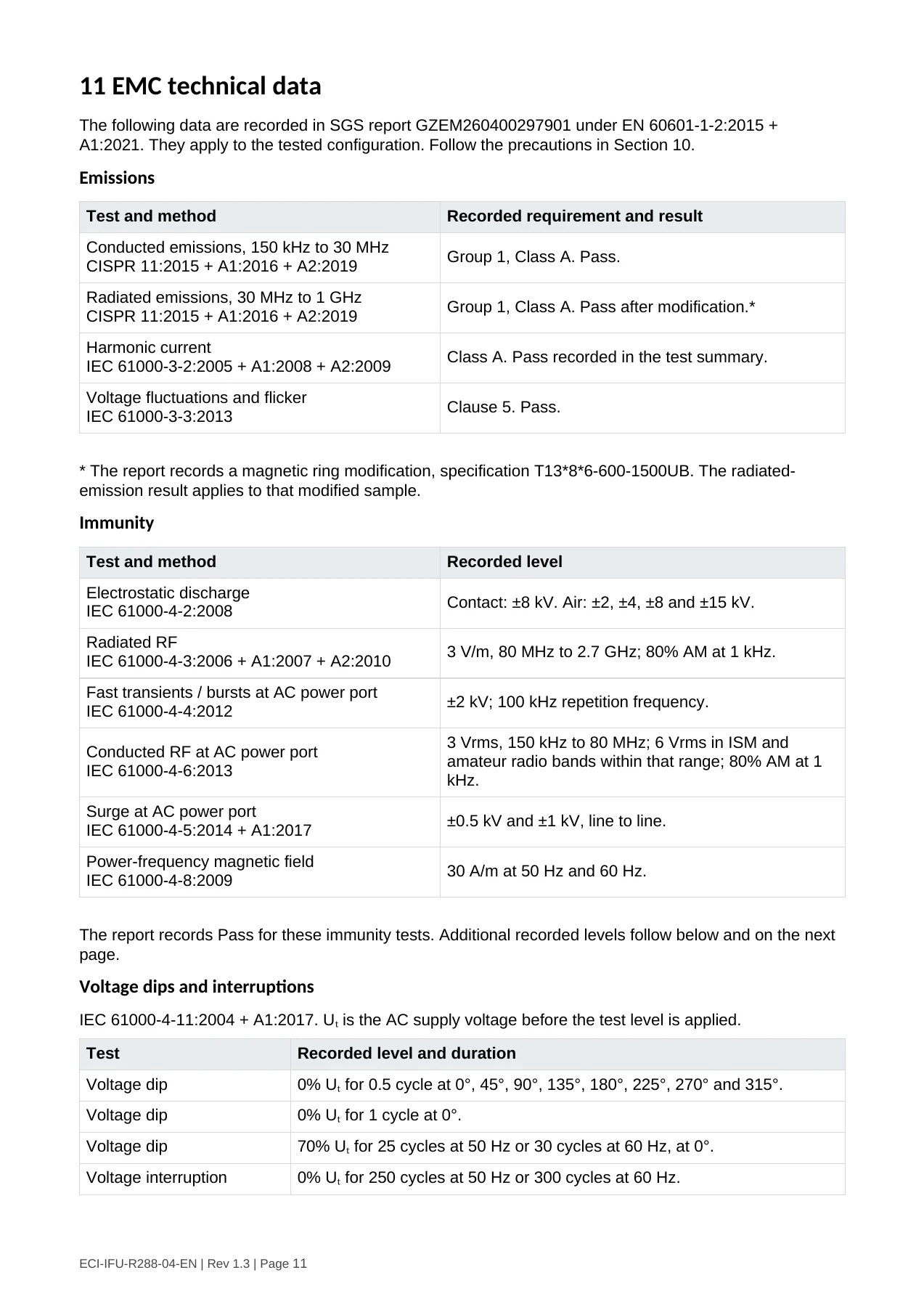
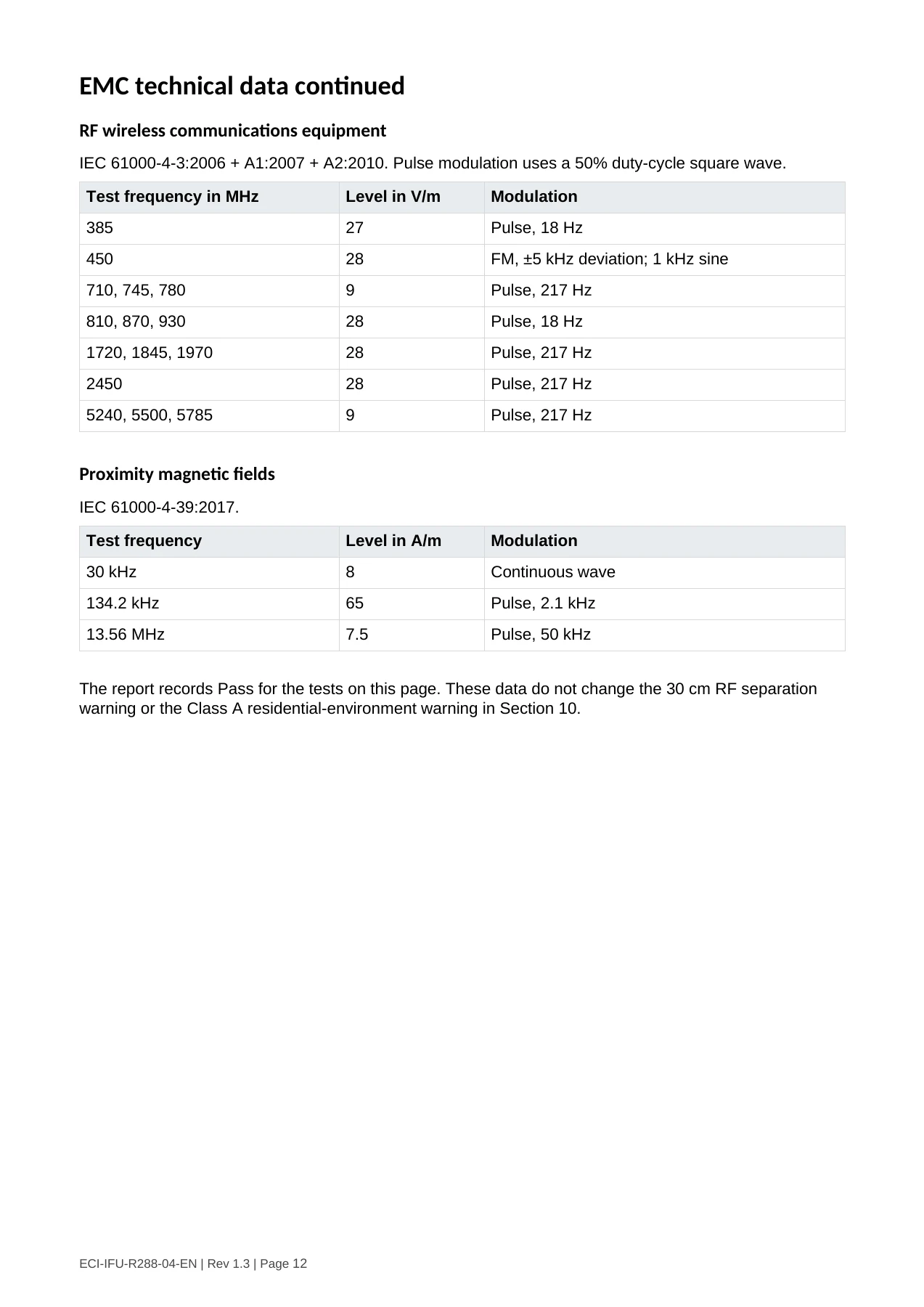
The wired remote control controls the seat lift, headrest, backrest and footrest. All nine buttons are
hold-to-run, including RESET. Hold the remote control upright as shown. Press and keep the
required button pressed during movement. Release it to stop adjustment. Keep the seated person,
any lines and the surrounding area in view.


Nine-button wired remote control. Hold it with the cable at the bottom, as shown.

 Button position                                           Function when pressed and held

 Upper group - top                                         Unfold the headrest.

 Upper group - left, downward triangle                     Lower the seat.

                                                           Reset all four motors: headrest, backrest, footrest and seat
 Upper group - centre, red ring
                                                           height.

 Upper group - right, upward triangle                      Raise the seat.

 Upper group - bottom                                      Fold the headrest.

 Lower group - upper left                                  Unfold / recline the backrest.

 Lower group - upper right                                 Fold / return the backrest towards upright.

 Lower group - lower left                                  Unfold / extend the footrest.

 Lower group - lower right                                 Fold / retract the footrest.


How to use reset
Press and keep the red centre button pressed to return the headrest, backrest, footrest and seat
height to their original positions. Reset acts on all four motors, including height adjustment. Keep the
button pressed throughout the return movement. Release it to stop. Do not press and release
expecting the chair to finish automatically.
The remote control has no emergency-stop button. Release the pressed button to stop
adjustment. Do not use RESET to stop unexpected movement; follow Section 8.
Before first use, a trained installer must verify all button functions and their stopping responses with
the chair unoccupied. Do not use the chair if its response differs from this section.
Keep the remote control dry and protected from accidental button presses. Do not pull on its cable,
place it under the seated person or leave it where the mechanism can trap it.


ECI-IFU-R288-04-EN | Rev 1.3 | Page 7
صفحة 8
8 Seating and operation
Before each use
Check the chair, upholstery, power supply, remote control and cables for damage. Confirm
secure supports and accessories, a stable level floor and a clear movement area.
Confirm that the person is an adult within the 150 kg maximum weight. Check that the person can
receive assistance when entering or leaving.
Arrange any lines or cables from items on the pole or in the holder with sufficient free length for
movement, away from pinch points. Check their position before and during every adjustment.
Do not start use if a control sticks, a movement is unexpected, stopping behaviour is abnormal, or
a component is loose. Remove the chair from service.
Entering and leaving the chair
1. Before entry, a trained staff member checks the person’s assistance needs and arranges the
required assistance. Position the empty chair on a stable, level floor and clear the transfer route.
2. Prepare the seat position before the person starts to sit down. Keep the footrest clear of the
transfer route. Release the control button before transfer begins.
3. Support the person while sitting down or standing up. Do not operate a control while the person is
getting into or out of the chair. Never use the footrest, pole or holder as a step or support handle.
4. Once the person is fully seated and supported, use the remote control for the required
adjustment. Watch the seated person, any lines and moving parts. Release the button at the
required position.
5. Before exit, stop chair adjustments and arrange trained assistance. Prepare the position while the
person is supported, then stop movement before the person starts to leave.
Adjustment during use
Observe the rated duty cycle: operate the motors for no more than 2 minutes, followed by at least 18
minutes of rest. Do not repeatedly restart a stalled mechanism or exceed this cycle to complete a
movement faster.
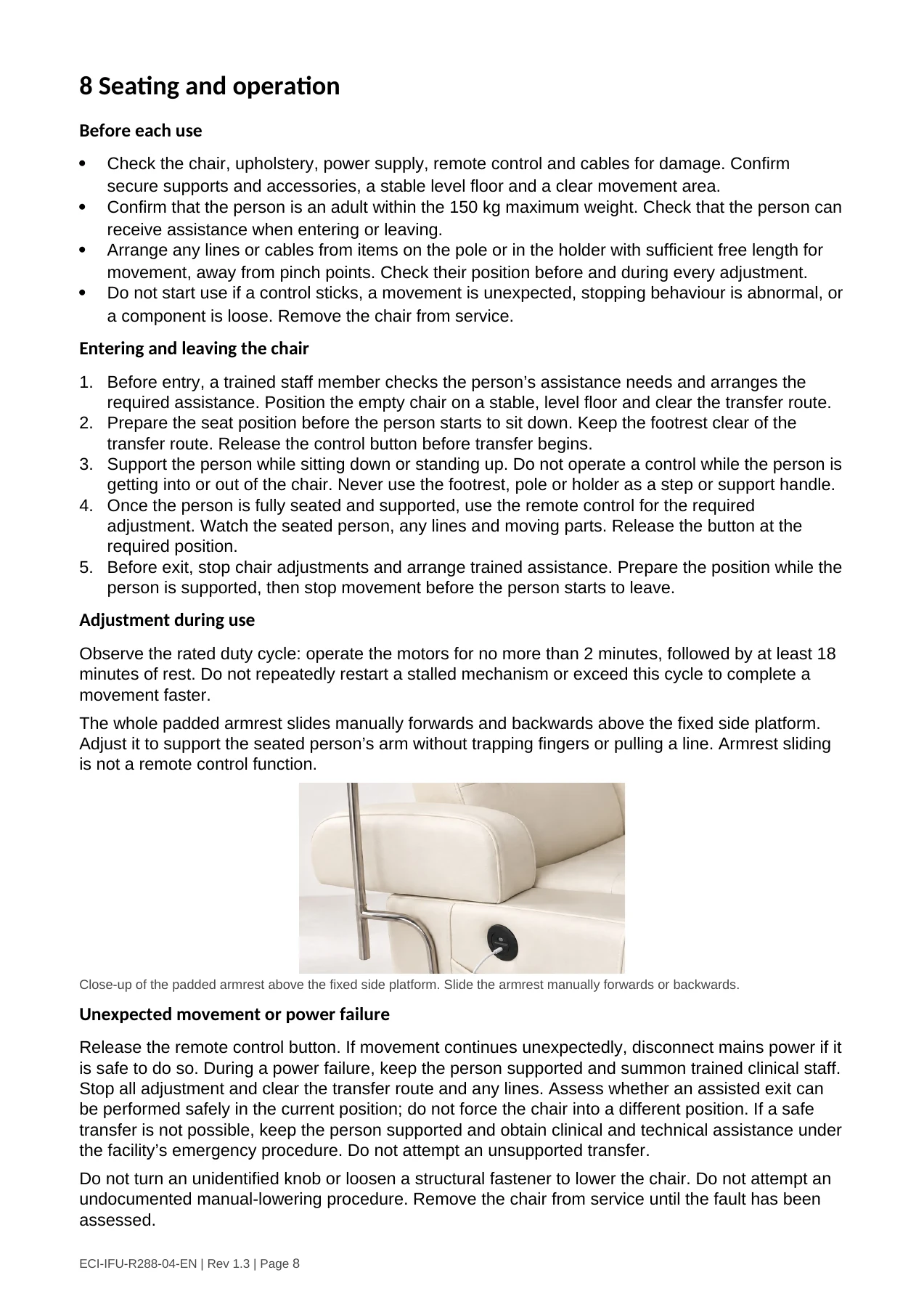
The whole padded armrest slides manually forwards and backwards above the fixed side platform.
Adjust it to support the seated person’s arm without trapping fingers or pulling a line. Armrest sliding
is not a remote control function.
Close-up of the padded armrest above the fixed side platform. Slide the armrest manually forwards or backwards.
Unexpected movement or power failure
Release the remote control button. If movement continues unexpectedly, disconnect mains power if it
is safe to do so. During a power failure, keep the person supported and summon trained clinical staff.
Stop all adjustment and clear the transfer route and any lines. Assess whether an assisted exit can
be performed safely in the current position; do not force the chair into a different position. If a safe
transfer is not possible, keep the person supported and obtain clinical and technical assistance under
the facility’s emergency procedure. Do not attempt an unsupported transfer.
Do not turn an unidentified knob or loosen a structural fastener to lower the chair. Do not attempt an
undocumented manual-lowering procedure. Remove the chair from service until the fault has been
assessed.
ECI-IFU-R288-04-EN | Rev 1.3 | Page 8صفحة 9
9 Cleaning maintenance and troubleshooting
Cleaning and disinfection between users and daily during use
1. Make sure the chair is unoccupied and remove loose items. Disconnect mains power. Follow the
   site's cleaning and disinfection procedures and wear suitable protective gloves.
2. The upholstery is PU leather. Remove soiling from the upholstery and hard surfaces with a soft
   lint-free cloth and mild detergent diluted in water. Remove detergent residue with a clean damp
   cloth and allow the surfaces to air-dry. Do not soak seams or allow liquid to enter switches,
   connectors or electrical enclosures.
3. Disinfect with ready-to-use hospital surface-disinfectant wipes based on 70% isopropyl alcohol.
   Keep the surface visibly wet for the full contact time stated on the wipe label, re-wetting if needed.
   Do not use other disinfectant types.
4. Use the wipe or cloth specified for the selected disinfectant. Rinse only when its label requires it.
   Allow all surfaces to air-dry fully, then inspect for damage or fluid ingress before reconnecting
   power.
Do not mix products, spray electrical parts, immerse components, steam-clean the chair or use
abrasive materials. Follow the site's established procedure for contamination that requires special
handling.
Protective paper does not replace cleaning or disinfection. Complete the required cleaning and
disinfection before the next patient.
Inspection and maintenance
No specific scheduled maintenance is required. The safety inspections and fault-related repair
checks below still apply.
 When                             Action and responsible person

                                  Operator checks damage, cable condition, stability, accessory retention and
 Before each use and daily
                                  control response.

 After damage or abnormal         Remove from service. A qualified technician checks structural retention, wiring,
 operation                        actuator operation and electrical safety before reuse.

 After repair or component        Verify correct parts, secure assembly and all movement/stopping functions;
 replacement                      document return-to-service approval.


Remove the chair from service for loose attachments, unstable movement, damaged cables, failed
stopping response, torn upholstery or surfaces that cannot be cleaned. Repairs and return-to-service
checks are for qualified personnel. Do not open electrical parts or tighten unknown fasteners to
guessed values.
Troubleshooting
 Problem                                Safe action

                                        Check that the supply is connected and the duty-cycle rest period is
 No movement                            complete. Do not open the adaptor or bypass protection. Seek service if
                                        unresolved.

 One direction fails or motion is       Stop use, support the seated person and disconnect power if safe. Contact
 unexpected                             technical support.

 Noise, looseness or unstable           Stop use. Do not continue adjustment or tighten unspecified fasteners while
 backrest/pole                          occupied. Arrange qualified inspection.

 Damaged upholstery or
                                        Remove from service and contact the supplier for repair or replacement.
 suspected fluid ingress


ECI-IFU-R288-04-EN | Rev 1.3 | Page 9
صفحة 10
10 Electromagnetic precautions and support
Essential performance
RelaxIV has no essential performance.
Electromagnetic disturbance response
If electromagnetic interference causes unexpected operation, release the remote control button,
support the person and disconnect mains power if it is safe to do so. Follow the assisted-exit
precautions in Section 8; powered repositioning may be unavailable.
Use environment
Use indoors in professional healthcare facilities only. The emissions characteristics of this equipment
make it suitable for use in industrial areas and hospitals (CISPR 11 Class A). If it is used in a
residential environment, for which CISPR 11 Class B is normally required, this equipment might not
offer adequate protection to radio-frequency communication services. The user might need to take
mitigation measures, such as relocating or reorienting the equipment.
Phones and other electrical equipment
Keep portable radio-frequency transmitters, including transmitting mobile phones and their antennas,
at least 30 cm from every part of the chair and its cables. Use the fitted phone and tablet holder only
with every radio function switched off as specified in Section 6. The holder does not permit a
transmitting device inside the 30 cm separation distance.
Avoid placing the chair directly beside or stacked with other electrical equipment. If this cannot be
avoided, check both devices for normal operation. If interference or unexpected operation occurs,
stop adjustment, protect the seated person and seek technical assistance.
Power supply cables and accessories
Use the A64A00290200 adaptor identified in Section 3 and the supplied compatible cable set and
nine-button wired remote control. Replacement parts must be specified by EverCare for the chair
model and serial number. Other cables or accessories can increase interference or make the chair
more sensitive to it, causing incorrect operation.
Manufacturer and technical support
EVERCARE INNOVATIONS (SHENZHEN) CO., LTD.
Unit 102, Building J, No. 3 Xiang Yuan Pai Road, Pingxi Community, Pingdi Subdistrict, Longgang
District, Shenzhen, Guangdong 518000, China
Email: service@evercare-innovations.com | Tel: +86 136 3167 8692
When requesting support, provide the model and serial number, remote control/adaptor identification
and fault description. Keep the instructions and service records with the chair.
EU authorised representative
MDSS GmbH
Schiffgraben 41, 30175 Hannover, Germany
Incident reporting
Report any accident or incident involving this chair to EverCare using the contact details above. In
the EU, also report any serious incident to the competent authority of the Member State where the
user and/or patient is established.
Disposal
Disconnect power and arrange safe decontamination before disposal. Use the appropriate
electrical/electronic waste collection route. Follow local requirements for contaminated materials and
recyclable structural parts. Contact EverCare or the local waste operator for assistance.


ECI-IFU-R288-04-EN | Rev 1.3 | Page 10
صفحة 11
11 EMC technical data
The following data are recorded in SGS report GZEM260400297901 under EN 60601-1-2:2015 +
A1:2021. They apply to the tested configuration. Follow the precautions in Section 10.

Emissions

 Test and method                                         Recorded requirement and result
 Conducted emissions, 150 kHz to 30 MHz
                                                         Group 1, Class A. Pass.
 CISPR 11:2015 + A1:2016 + A2:2019
 Radiated emissions, 30 MHz to 1 GHz
                                                         Group 1, Class A. Pass after modification.*
 CISPR 11:2015 + A1:2016 + A2:2019
 Harmonic current
                                                         Class A. Pass recorded in the test summary.
 IEC 61000-3-2:2005 + A1:2008 + A2:2009
 Voltage fluctuations and flicker
                                                         Clause 5. Pass.
 IEC 61000-3-3:2013


* The report records a magnetic ring modification, specification T13*8*6-600-1500UB. The radiated-
emission result applies to that modified sample.

Immunity

 Test and method                                         Recorded level
 Electrostatic discharge
                                                         Contact: ±8 kV. Air: ±2, ±4, ±8 and ±15 kV.
 IEC 61000-4-2:2008
 Radiated RF
                                                         3 V/m, 80 MHz to 2.7 GHz; 80% AM at 1 kHz.
 IEC 61000-4-3:2006 + A1:2007 + A2:2010
 Fast transients / bursts at AC power port
                                                         ±2 kV; 100 kHz repetition frequency.
 IEC 61000-4-4:2012
                                                         3 Vrms, 150 kHz to 80 MHz; 6 Vrms in ISM and
 Conducted RF at AC power port
                                                         amateur radio bands within that range; 80% AM at 1
 IEC 61000-4-6:2013
                                                         kHz.
 Surge at AC power port
                                                         ±0.5 kV and ±1 kV, line to line.
 IEC 61000-4-5:2014 + A1:2017
 Power-frequency magnetic field
                                                         30 A/m at 50 Hz and 60 Hz.
 IEC 61000-4-8:2009


The report records Pass for these immunity tests. Additional recorded levels follow below and on the next
page.

Voltage dips and interruptions
IEC 61000-4-11:2004 + A1:2017. Uₜ is the AC supply voltage before the test level is applied.

 Test                               Recorded level and duration
 Voltage dip                        0% Uₜ for 0.5 cycle at 0°, 45°, 90°, 135°, 180°, 225°, 270° and 315°.
 Voltage dip                        0% Uₜ for 1 cycle at 0°.
 Voltage dip                        70% Uₜ for 25 cycles at 50 Hz or 30 cycles at 60 Hz, at 0°.
 Voltage interruption               0% Uₜ for 250 cycles at 50 Hz or 300 cycles at 60 Hz.


ECI-IFU-R288-04-EN | Rev 1.3 | Page 11
صفحة 12
EMC technical data continued
RF wireless communications equipment
IEC 61000-4-3:2006 + A1:2007 + A2:2010. Pulse modulation uses a 50% duty-cycle square wave.

 Test frequency in MHz                   Level in V/m   Modulation
 385                                     27             Pulse, 18 Hz
 450                                     28             FM, ±5 kHz deviation; 1 kHz sine
 710, 745, 780                           9              Pulse, 217 Hz
 810, 870, 930                           28             Pulse, 18 Hz
 1720, 1845, 1970                        28             Pulse, 217 Hz
 2450                                    28             Pulse, 217 Hz
 5240, 5500, 5785                        9              Pulse, 217 Hz


Proximity magnetic fields
IEC 61000-4-39:2017.

 Test frequency                          Level in A/m   Modulation
 30 kHz                                  8              Continuous wave
 134.2 kHz                               65             Pulse, 2.1 kHz
 13.56 MHz                               7.5            Pulse, 50 kHz


The report records Pass for the tests on this page. These data do not change the 30 cm RF separation
warning or the Class A residential-environment warning in Section 10.


ECI-IFU-R288-04-EN | Rev 1.3 | Page 12
صفحة 13
Identification and document control
RelaxIV Electrically powered infusion chair
Medical device | Non-sterile | Reusable | Professional healthcare use
 Model / catalogue number                UDI-DI (GTIN, 14-digit representation)

 IVR-100                                 06980438430010

 IVR-101                                 06980438430034

 IVR-102                                 06980438430041

 IVR-103                                 06980438430058

 IVR-104                                 06980438430065
The UDI-DI identifies the product model, not an individual unit. Read the unit’s serial number and lot
number from its product label. Match the model and unit identification on the device, packaging and
accompanying records before use. Do not substitute the manufacturer SRN for a product UDI.
Manufacturer identification
EVERCARE INNOVATIONS (SHENZHEN) CO., LTD.
Unit 102, Building J, No. 3 Xiang Yuan Pai Road, Pingxi Community, Pingdi Subdistrict, Longgang
District, Shenzhen, Guangdong 518000, China
Manufacturer SRN: CN-MF-000060301
Email: service@evercare-innovations.com | Telephone: +86 136 3167 8692
Website: www.evercare-innovations.com
EU authorised representative
MDSS GmbH
Schiffgraben 41, 30175 Hannover, Germany
Revision identification
ECI-IFU-R288-04-EN-v1.3 | Rev 1.3 | English | 25 October 2026
Changes since released Rev 1.1: full manufacturer address and identification page (manufacturer
SRN, model and GTIN mapping, authorised representative and CE marking); residual risks; 70 kg
chair mass; assisted exit and emergency procedure during power failure; phone/tablet-holder radio
restrictions; and cleaning and disinfection instructions. Revision 1.2 was an unreleased draft.


ECI-IFU-R288-04-EN | Rev 1.3 | Page 13